A typical campaign has three parts: you approve the matched investors and their messages, SeedForge runs an automated sequence on your connected LinkedIn account, and you take over any investor who replies. You pay only on outcomes, and your first month is free.
Your 30-day trial starts when outreach first goes live. Everything is free during the trial, and the wallet deposit is waived.
Here is how it runs:
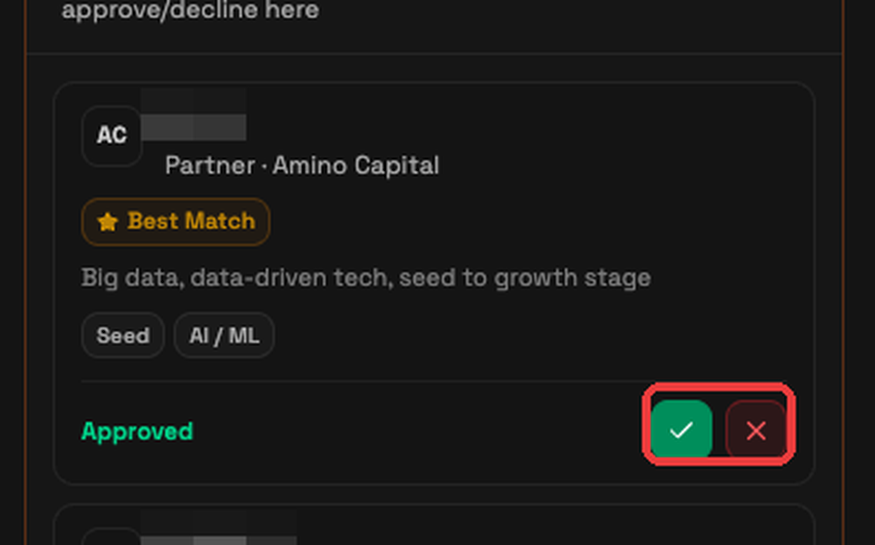
You approve the roster. Before launch you review the matched investors and the message templates SeedForge drafted, then approve or decline each one or use Approve all. Approved contacts sit in Queued until the sequence starts.
SeedForge runs the sequence. For each investor it views the profile, likes a recent post, sends a connection request, then sends up to three messages once they connect, each one day apart, and stops as soon as they reply. If you are already connected, it skips the request and goes straight to messaging.
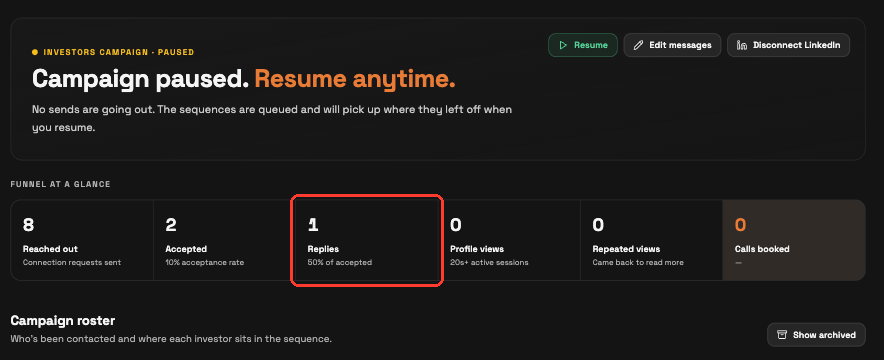
You take over replies. Replies land in your normal LinkedIn inbox. The investor moves into Engaged and the Replies counter updates. Open the thread, reply yourself, then archive the contact.
The Campaign roster groups contacts into Queued, In progress, Engaged, and Finished. Queued includes approved contacts waiting to start. Replies and recorded calls move contacts into Engaged, where you can take over the conversation.
Funnel at a glance counts the campaign: Reached out, Accepted, Replies, Profile views, Repeated views, and Calls booked. Outcomes are where charges come from: a flat $10 when a call is booked, and $10 when a warm intro is offered. Your first month of outreach is free. See HC-6.1 for the full breakdown.
Note: This is a long-term campaign and the pace is slow on purpose. First results typically show in about one week.
Tip: Profiles with a completed AI Session tend to get better outcomes. Your first AI Session is free.
Quick answers
How many messages does SeedForge send?
Up to three after the investor accepts your connection request, each one day apart, stopping as soon as they reply.
What happens when an investor replies?
The conversation lands in your normal LinkedIn inbox and the Replies counter ticks up, and you take over from there.