Your SeedForge Profile is a live page that investors open through a link you send. It holds your Fundraising details, Pitch Recording, Documents, and Team. Your evaluation and score stay on SeedForge's Feedback, where only you see them. To share it, open Profile & Proof > Share your Profile, create a named link, choose its visible sections, and copy it to send.

How to share your SeedForge Profile
Open sharing controls. Expand Profile & Proof, then click Share your Profile.
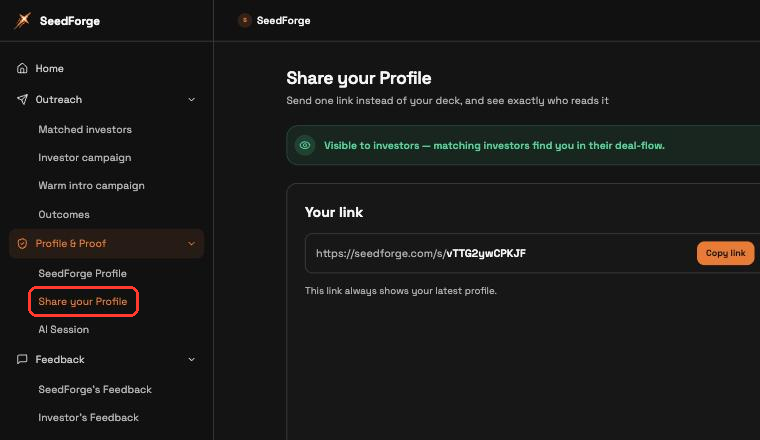
Create a named link. Click Create link and name it for the investor or fund you are sending it to.
Set what this investor sees. Open Link Privacy Settings, then use Visible sections to choose the sections and individual documents this link shows.
Copy the link and send it. Click Copy link next to the link URL, then send it to that investor.

What happens after you share
Each investor gets their own link, so the visitors log on Share your Profile shows which link was opened and how it was read. A link asks for an email only if you turn on Require email to view, which is off by default.
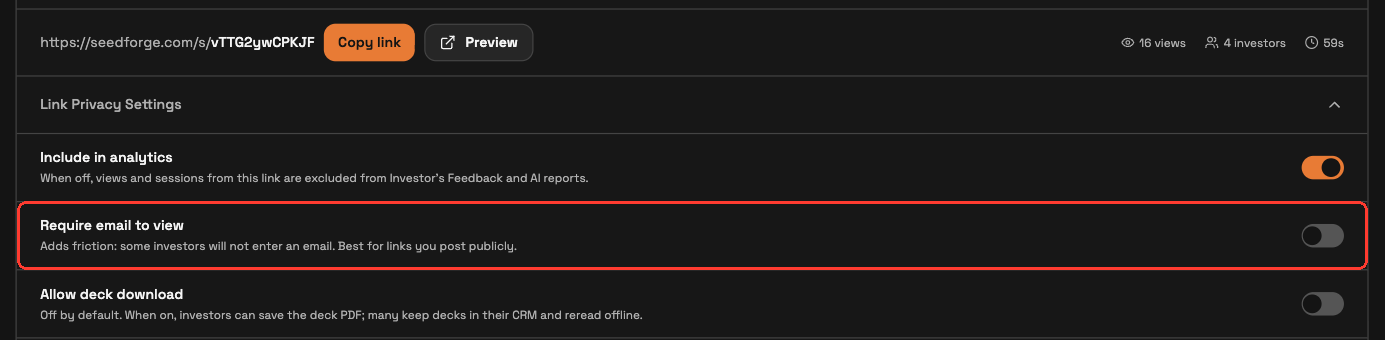
Each link has its own controls. The toggle turns the link on or off. Preview shows exactly what that investor sees. The trash icon deletes it. Individual links can be disabled at any time.
Your profile updates on its own. Upload a new deck or change a metric, and every active link shows the current version, as long as that section stays visible. You never resend a link.
Note: Your profile stays private. Nothing is shared without a link you send, and each link shows only the sections you turned on.
Quick answers
Do investors need an account to view my profile?
No. Anyone with your link sees the sections you shared. They are asked for an email only if you turned on Require email to view for that link.
Will investors see my latest deck after I update it?
Yes. Any profile change, including a new deck, appears on every active link automatically, as long as that section stays visible.
Can I stop someone from viewing my profile?
Yes. Turn off or delete that link on Profile & Proof > Share your Profile.