Yes, you can redo the AI Session as many times as you want. First AI Session is free. After the 30-day trial, additional AI Sessions are $25 each. The charge comes from your wallet balance when you start the session.
How to start a new session
Open AI Session. In the left menu, expand Profile & Proof, then click AI Session.
Review the session page. It shows the data sources for your next session and your previous sessions.
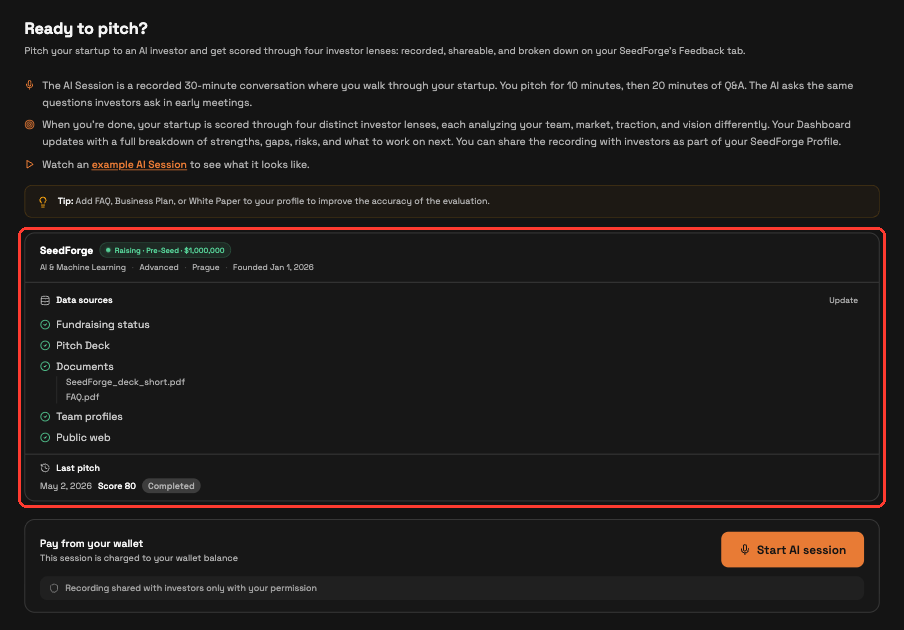
Click Start AI Session. During the 30-day trial, sessions are free. After the trial, additional sessions are $25 each. The session runs like your first one.
What changes after a new session
The new session replaces your previous results everywhere. SeedForge's Feedback updates with the new score, strengths, gaps, and risks, and only you see them.
Your history is on AI Session, under Profile & Proof. Open that page to see previous sessions and their status.
Note: a dropped session consumes the session credit, including your free first session. Make sure your internet connection is stable.
When is a redo worth it
Run a new session after a pivot, a period of growth, or as a monthly refresh while you talk to investors. There is no cap on the number of sessions and no waiting period between them.
Quick answers
How much does it cost to redo the AI Session?
First AI Session is free. After the 30-day trial, additional AI Sessions are $25 each. The charge comes from your wallet balance when you start.
Do investors see my session results?
No. Your results stay on SeedForge's Feedback, where only you see them. Past sessions stay visible to you on AI Session, under Profile & Proof.
What happens if my session disconnects halfway?
A dropped session consumes the session credit, including the free first session. Start with a stable internet connection.