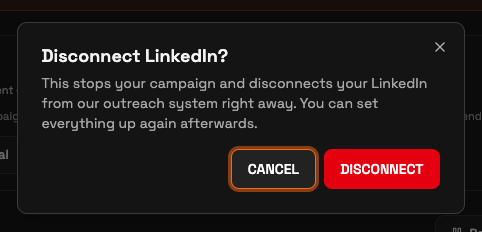
You disconnect your LinkedIn account from Outreach > Investor campaign. Click Disconnect LinkedIn at the top right of the campaign header, then click Disconnect in the confirmation dialog. Disconnecting removes the connected senders and preserves your leads for reconnection.
Disconnect your account
Open Investor campaign. Expand Outreach, then click Investor campaign.
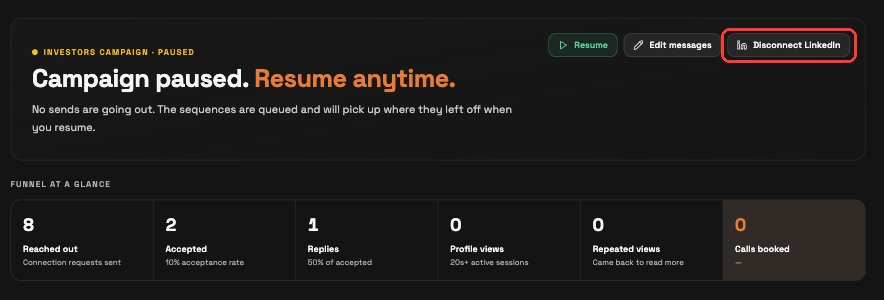
Click Disconnect LinkedIn. Find it at the top right of the campaign header, beside the campaign controls. A confirmation dialog opens.
Confirm. In the Disconnect LinkedIn? dialog, click Disconnect. To leave the connection in place, click Cancel.
What happens when you disconnect
Disconnecting removes the connected senders. SeedForge keeps your leads and their decisions so you can reconnect later.
Conversations you already started stay in your LinkedIn inbox, so you keep talking to those investors yourself. SeedForge no longer withdraws the connection requests that sit unaccepted, because that only runs while connected.
Your wallet balance stays on your account after you disconnect. To get it back, use Request withdrawal.
Note: Disconnecting stops new outcome charges (a booked call or a warm intro offered). Profile views are always free.
Note: You can reconnect the same LinkedIn account later. Your leads and their decisions are preserved.
Quick answers
Does disconnecting LinkedIn delete my campaign?
Your leads and their decisions stay saved when you disconnect. You can reconnect later.
Do I get my wallet balance back when I disconnect?
Your balance stays on your account after you disconnect. To request a withdrawal, click your wallet balance to open Billing, then use Request withdrawal.
Can I reconnect my LinkedIn after disconnecting?
Yes. You can reconnect the same account, and your leads and their decisions remain saved.